

How to Optimize SERP Snippets to Boost Click-Through Rates

SERP snippets are the title, URL, and description lines Google displays for your page in search results. Optimizing them can lift click-through rates 20 to 40 percent without changing your ranking position. You’ll audit your current snippets in Search Console, rewrite title tags and meta descriptions to trigger curiosity and match search intent, clean up URLs, and add schema markup for rich results like star ratings or FAQ boxes. The entire workflow takes two to four hours for a typical site and requires no coding beyond pasting HTML into your CMS.
Most publishers treat snippets as an afterthought, copying auto-generated defaults or stuffing keywords without testing what actually earns clicks. That wastes the traffic you already rank for. A well-crafted snippet answers the searcher’s unspoken question (“Will this page solve my problem faster than the nine others?”) in under two seconds. Mobile users see even less text, so every character counts. The good news: you control nearly every element Google shows, and the Search Console CTR report tells you exactly which pages underperform.
This guide walks through the complete optimization process: identifying low-CTR pages worth fixing first, writing snippets that stand out in crowded result sets, previewing how they render on phones, deploying schema for enhanced features, and measuring lift within days. No guesswork, no fluff.
What You Need to Optimize SERP Snippets

You can optimize SERP snippets with tools you likely already have. The critical requirement is access to your site’s backend, whether that’s WordPress, Shopify, a custom CMS, or direct HTML files, so you can edit title tags, meta descriptions, and add schema markup. Beyond that, you’ll need performance data to identify which pages deserve attention first and competitor insights to understand what snippet patterns win clicks in your niche.
- Google Search ConsoleProvides CTR and impression data for every page and query, revealing which pages get seen but not clicked (your primary optimization targets).
- SEO research tool (Ahrefs, SEMrush, or similar), Lets you analyze competitor snippets in search results, track keyword rankings, and spot rich snippet opportunities you’re missing.
- Spreadsheet or task trackerOrganizes your audit findings, prioritizes pages by traffic potential, and documents before-and-after snippet changes so you can measure impact.
- SERP preview toolSimulates how your snippets will appear on desktop and mobile before you publish, catching truncation issues and layout problems (many SEO platforms include this).
- Schema markup validatorGoogle’s Rich Results Test or validator confirms your structured data is error-free and eligible for enhanced display.
- A/B testing platform (optional), Tools like SearchPilot or RankScience let you test snippet variations on live traffic, though manual tracking in Search Console works for most sites.
If you’re optimizing a handful of high-value pages, Search Console plus direct CMS access covers the essentials. For larger sites or systematic optimization across hundreds of pages, the SEO tool becomes critical for efficient competitor research and the spreadsheet keeps your workflow from devolving into chaos. The schema validator matters only when you’re implementing structured data, but verifying markup before launch prevents wasted effort on broken code that won’t trigger rich snippets.
Common Pitfalls That Tank Snippet CTR
Before you touch a single title tag, scan your site for these snippet killers. Each one quietly hemorrhages clicks, and fixing them delivers immediate wins.
Duplicate and auto-generated meta descriptions are the most widespread mistake. When your CMS stamps “Welcome to our website” across dozens of pages, or copies the first sentence of body text verbatim, Google often ignores your description and rewrites it on the fly. The algorithmic replacement rarely sells your page as well as a human-crafted pitch. Check your site for repeating patterns, if ten pages share identical snippets, each one competes with itself instead of standing out.
Keyword stuffing turns readers away. Jamming “best running shoes best running shoes 2026 buy running shoes” into 160 characters signals spam, not authority. Google’s evolved far beyond exact-match triggers; stuffed snippets now look outdated and untrustworthy compared to conversational competitors.
Exceeding character limits causes truncation mid-sentence. Titles cut off at 60 characters look unfinished, and descriptions that hit 165+ characters end with an ellipsis that swallows your call to action. Desktop and mobile cutoffs differ slightly, so previewing both views prevents accidental cropping.
Ignoring rich snippet opportunities leaves easy wins on the table. If competitors display star ratings, FAQs, or how-to steps directly in results while your listing stays plain text, you’re invisible by comparison. Schema markup isn’t optional in 2026; it’s baseline competitive hygiene.
Neglecting mobile preview differences means your snippet works beautifully on desktop but truncates awkwardly on phones, where most searches happen. Mobile displays fewer characters and prioritizes visual elements differently. Always preview both before publishing.
Step-by-Step Snippet Optimization Process
Audit Current Performance and Identify Opportunities
Start by pulling your performance data from Google Search Console. Navigate to the Performance report, set your date range to the last 90 days for a reliable sample, and export the Pages report as a CSV. You need three columns: URL, clicks, impressions, and CTR.
Sort by impressions descending. Pages with 1,000+ impressions but CTR below 2% are your prime targets, they’re already visible but failing to convert eyeballs into visits. Flag these as quick wins; even a modest CTR bump from 1.5% to 3% doubles your traffic without touching rankings.
Next, hunt for truncation issues. Copy your top 20 underperforming URLs into a SERP preview tool like Mangools or Yoast’s snippet editor. Title tags exceeding 60 characters or meta descriptions past 155 characters get cut off mid-sentence, killing click appeal. Mark every truncated snippet for rewriting.
Cross-reference your page list against your CMS. Run a site crawl with Screaming Frog or your preferred tool, filtering for pages with missing or duplicate meta descriptions. Missing descriptions force Google to auto-generate snippets from body text, usually bland, keyword-light excerpts that don’t sell the click. Duplicates across multiple pages dilute your messaging and waste SERP real estate.
Rank your fix list by monthly impression volume times potential CTR lift. A page with 10,000 impressions at 1% CTR gaining 2 percentage points delivers 200 extra monthly clicks, your highest-leverage work.
Analyze Top-Performing Competitor Snippets
Search your target keyword and screenshot the top five organic results. Don’t just skim, study what those snippets actually say and how they’re structured. You’re reverse-engineering what already works in your niche.
Look for title patterns first. Do winners front-load the keyword or bury it? Count how many use numbers (“7 Ways”), dates (“2026 Guide”), or brackets (“[Updated]”). Notice which titles promise a specific outcome versus vague value. Check character length; competitors ranking high often max out the visible space without truncation.
Move to meta descriptions. Identify the hook, does it ask a question, call out a pain point, or promise a fast solution? Spot emotional triggers: urgency (“before it’s too late”), curiosity (“what most guides miss”), or social proof (“trusted by 10,000 marketers”). Note how many descriptions include a call to action.
Finally, catalog rich snippet features. Which results show star ratings, FAQ accordions, or how-to steps? Those formats grab visual real estate and push standard snippets down. Patterns you find here become your template for the next step.
Write Click-Worthy Title Tags
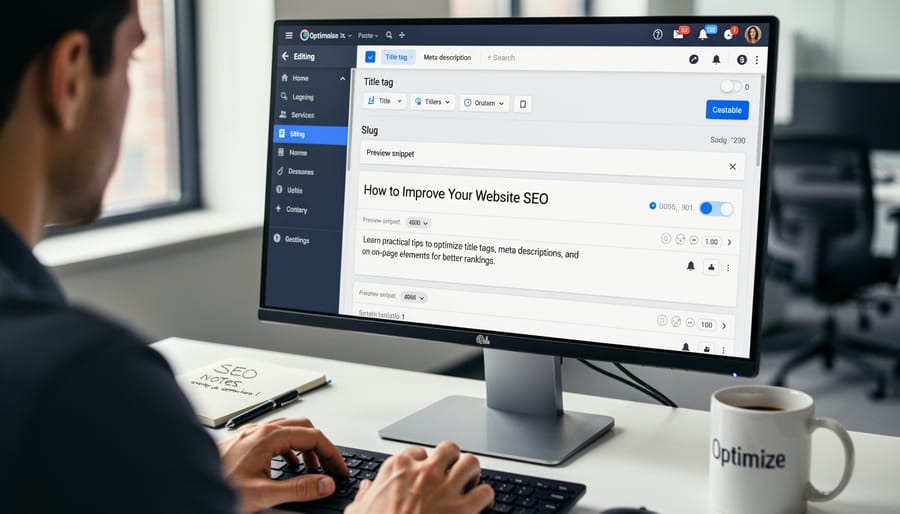
Place your primary keyword within the first eight words of the title. Google’s algorithm weighs front-loaded terms more heavily, and users scanning results anchor on the opening phrase. A title starting “SERP Snippets: How to Optimize” signals relevance faster than “How to Optimize Your SERP Snippets for Better CTR.”
Stay within 50-60 characters to prevent truncation. Google’s display width is measured in pixels, not characters, so meta tags may truncate unpredictably depending on letter width. A 55-character budget gives you safety margin across devices. Type your draft into a SERP preview tool and check the mobile view before publishing.
Follow this process to build a click-worthy title:
- Write the core keyword phrase (the exact query you’re targeting).
- Add a power modifier: a year (2026), a number (7 Ways, 12 Tips), or a benefit (Fast, Proven, Free).
- Insert brackets or pipes to create visual separation and boost perceived value ([Guide], | Expert Tips).
- Check character count and trim filler words (remove “the”, “a”, “for you”).
- Read it aloud to confirm it sounds like a promise, not a label.
Before: “Information About How to Write Meta Descriptions That Work”
After: “Meta Descriptions That Drive Clicks [2026 Guide]”
Before: “A Guide to Understanding Title Tag Best Practices”
After: “Title Tag Optimization: 5 Rules That Boost CTR”
The “after” versions lead with the keyword, use modifiers (year, number), stay under 55 characters, and promise a specific outcome. Test two title variants against each other when traffic volume permits. A five-point CTR lift on a high-impression page compounds into thousands of extra visits annually.
Craft Compelling Meta Descriptions
Treat your meta description as a 155-character sales pitch, not a content summary. Your goal is to convince searchers that clicking your result will solve their problem faster or better than the nine other options on the page.
Start by expanding on the promise in your title tag. If your title is “How to Fix a Leaking Faucet in 10 Minutes,” your description should preview the method or outcome: “Turn off water, replace the O-ring, and stop the drip, no plumber needed. Step-by-step photos included.” Lead with the benefit or answer, then add supporting details that differentiate your page.
Use active voice and action verbs throughout. Write “Learn three pruning techniques that double rose blooms” instead of “This guide covers rose pruning methods.” Commands and questions work: “Discover why,” “See how,” “Ready to,” or “Which option fits your budget?” These constructions create momentum and invite the click.
Stay ruthlessly within 150-160 characters to avoid truncation on mobile and desktop. Google may rewrite descriptions if they’re too generic or mismatched to the query, so make every word count. Cut filler phrases like “In this article” or “We will discuss”, jump straight to value.
Weave in secondary keywords naturally where they reinforce the benefit. For a page targeting “home office lighting,” you might write: “Choose task lamps, reduce screen glare, and avoid eye strain with these desk setups for remote workers.” The phrase “remote workers” captures a related search without forcing the fit.
Avoid hype or empty promises. “Best tips” and “ultimate guide” mean nothing unless you back them with specificity: concrete numbers, named techniques, or a clear time-to-result.
Optimize URL Slugs and Breadcrumb Paths
Clean, readable URLs boost CTR because users scan them for relevance and trustworthiness before clicking. Strip out stop words (a, the, and), session IDs, and parameters; keep slugs short and frontload your primary keyword. For example, `/optimize-serp-snippets` outperforms `/how-to-optimize-your-serp-snippets-for-better-click-through-rates-2026`. Hyphens separate words; avoid underscores or camelCase.
Implement breadcrumb markup in snippets using JSON-LD so Google displays your site hierarchy (`Home > SEO > On-Page`) in place of the raw URL. This builds context and authority, especially for multi-page entities where category paths signal topic depth. Validate your breadcrumb schema in Google’s Rich Results Test.
Only update URLs on new content or unpublished drafts. For established pages with backlinks and ranking history, changing the slug forfeits link equity unless you implement 301 redirects, which still bleed some authority. Weigh the CTR gain against the ranking risk, most times, optimizing the title and description delivers the same lift without touching the URL.
Add Structured Data for Rich Snippets
Structured data turns plain search listings into eye-catching rich results, star ratings, FAQ accordions, step-by-step instructions, pricing, event dates, that occupy more real estate and signal credibility. Start by auditing your content type: FAQ pages, how-to guides, product listings, recipes, reviews, local business info, and events all qualify for specific schema types. Use documentation to match your content to the right vocabulary (FAQPage, HowTo, Product, Review, Recipe, Event, LocalBusiness).
Implement JSON-LD markup in your page’s “ or immediately after the opening “ tag, schema placement matters for both crawler parsing and entity recognition. Don’t rely on plugins alone; inspect the raw output. Include all required properties (name, description, image URLs, dates) and useful optional ones (author, aggregateRating, price). Google’s Rich Results Test and Schema Markup Validator will flag errors before you publish.
In 2026, FAQ and HowTo schema are table stakes for procedural content, they consistently win featured snippets and People Also Ask placements. Product schema with reviews and pricing data drives higher CTR on e-commerce queries. Review schema (for editorial reviews, not self-promotion) earns stars in SERPs. Breadcrumb and Organization schema won’t create flashy snippets but improve overall entity understanding, supporting knowledge graph schemas that indirectly lift brand visibility. Prioritize schema types where competitors already show rich results, if you’re the only plain listing, you’re invisible.
How to Test and Verify Your Changes

Before you publish, preview your snippets with tools like Merkle’s SERP Preview or Yoast’s snippet editor to catch truncation and formatting issues. Check both desktop and mobile views, Google often shortens descriptions more aggressively on mobile. If you’ve added structured data, validate it with Google’s Rich Results Test and confirm the markup renders as expected; incorrect JSON-LD placement can prevent rich snippets from appearing at all.
Once live, open Search Console and filter Performance reports by the updated pages. Track CTR trends over the next 30-60 days, comparing against the pre-change baseline. A successful snippet typically lifts CTR by 10-30 percent within the first month, though competitive niches may take longer to stabilize. Watch your average position closely: if rankings drop more than a few spots, Google may consider your new snippet less relevant to the query, signaling you’ve over-optimized for clicks at the expense of intent match.
Document your changes in a spreadsheet, log the page URL, old vs. new title and description, publication date, and resulting CTR delta. This record reveals which snippet patterns resonate with your audience (numbers in titles, question formats, specific benefits) and guides future optimizations. If CTR doesn’t budge after 60 days and impressions remain steady, test a different hook or value proposition. Conversely, if CTR jumps and rankings hold or improve, leave the snippet alone and apply the winning formula to similar pages.
Frequently Asked Questions
How long until my snippet changes appear in search results?
Google typically recrawls and updates snippets within a few days to two weeks, depending on your site’s crawl frequency. You can request faster indexing through Search Console’s URL Inspection tool, though Google decides whether to honor the request.
Does Google always use my meta description?
No. Google rewrites descriptions roughly 70% of the time, pulling text it considers more relevant to the specific query. Writing clear, benefit-focused descriptions increases the odds Google uses yours, but search intent ultimately drives what appears.
Can optimizing snippets help me win featured snippets?
Indirectly, yes. Featured snippets pull from page content, not meta descriptions, but clear titles and structured data signal topic relevance. If you want featured snippets, format answers as concise paragraphs or lists in your body content and make schema work with FAQ or How-to markup.
Do snippet changes affect my rankings?
Not directly. Snippets influence CTR, not ranking position, but sustained CTR improvements can send positive engagement signals over time. Misleading snippets that spike bounce rates may eventually hurt rankings, so promise only what the page delivers.
Most sites see snippet performance stabilize after 30 to 60 days. Track CTR trends in Search Console rather than obsessing over daily fluctuations. If a snippet underperforms after two months, test a new angle, swap the benefit hook, add the current year, or try a question format. Competitive niches demand ongoing iteration, while evergreen content often holds steady once optimized. Aim for CTR that exceeds your position’s baseline (position one averages 30-40%, position five around 5-8%), but context matters more than arbitrary benchmarks.

