

How to Clean Up Toxic Links Before They Cost You Traffic

Every backlink portfolio you inherit (or build) carries threats that can erase months of work overnight: toxic donors, algorithmic filters quietly suppressing pages you thought were ranking, and the occasional competitor sabotage attempt. The cleanup playbook is a five-step loop, identify the risk, analyze severity, mitigate via removal or disavow, monitor recovery, and prevent re-exposure with controlled placements going forward. In most audits I’ve run, the bottleneck isn’t the disavow file. It’s the triage that comes before it.
Step 1: Identify Risk, Audit Your Backlink Profile

What You’re Looking For
Before you can manage link risk, you need to recognize the patterns that trigger penalties. Look, the same five signatures show up in nearly every dirty profile I’ve audited. Every single one. Scan for them first, then drill into the edge cases.
Quick vocabulary
- Disavow
- A text file submitted to Google Search Console listing domains or URLs whose backlinks you want the algorithm to ignore. Doesn’t remove the link, only neutralizes its influence.
- Manual action
- A human-issued penalty from Google’s web-spam team, surfaced inside Search Console. Requires a reconsideration request to lift.
- Algorithmic filter
- An automated suppression applied by Google’s ranking systems (Penguin lineage, SpamBrain). No notification, just a quiet ranking drop you have to diagnose from traffic data.
- Footprint
- A repeatable technical fingerprint across “independent” sites, shared hosting IPs, identical themes, matching registrants, that flags coordinated link schemes.
- Anchor-text dilution
- Deliberately diversifying your anchor mix (brand mentions, naked URLs, varied phrases) to push the exact-match keyword ratio below filter thresholds.
Private blog networks are clusters of low-quality sites built solely to pass link equity. They share hosting footprints, thin content, and interlocking link structures. Google’s algorithms detect these patterns quickly, and PBN penalty risks are among the highest in link building. Irrelevant niche links signal manipulation. Or, more accurately, irrelevant niche links in volume signal manipulation. A single stray recipe-blog link from 2019 isn’t the issue. If your SaaS site has backlinks from recipe blogs, payday loan directories, or adult content showing up in clusters, you’ve likely acquired spam or purchased links from sellers scraping unrelated sites.
Over-optimized anchor text is another tell, probably the most reliable one. If 40% of your anchors match your target keyword exactly, you’re likely to trigger a manual review. (Ran a cleanup last quarter where the inherited profile sat at 47% exact-match on three money pages. The disavow file practically wrote itself.) Natural link profiles show brand mentions, URLs, and varied phrases. Foreign language spam floods your profile with links from hijacked WordPress sites, hacked forums, or auto-generated pages in languages unrelated to your audience. These rarely pass value and often indicate negative SEO. Finally, check if linking domains themselves are penalized. Ahrefs and similar crawlers flag sites with traffic drops or manual actions. Understanding what Google penalizes helps you spot these toxic sources before they damage your rankings.
The bottleneck isn’t the disavow file. It’s the triage that comes before it.
Toxic vs Benign Signals at a Glance
The same surface metrics produce wildly different verdicts depending on the pattern they sit inside. This is the matrix I run mentally on every referring domain before I open a third-party tool:
| Signal | Benign profile | Toxic profile |
|---|---|---|
| Anchor distribution | Mostly brand, naked URLs, and long-tail phrases; exact-match under 5% | Exact-match commercial anchors above 20–30%, often clustered on money pages |
| Donor topical fit | Industry-adjacent sites, complementary niches, occasional generic publications | Random verticals (recipes, payday loans, adult, gambling) linking to a B2B SaaS |
| Growth velocity | Linear over months, correlated with content launches or PR moments | Hockey-stick spikes, hundreds of refdomains in a week with no campaign behind them |
| Donor footprint | Independent hosting, distinct themes, organic traffic on the donor itself | Shared IP ranges, identical templates, near-zero organic traffic on linking pages |
| Language match | Donor language matches your audience or is a known translation partner | Cyrillic, CJK, or Indonesian-language donors pointing at an English commercial page |
| Donor health | Stable DR, indexed pages, fresh content, no manual-action history | Traffic collapse, deindexed sections, or visible manual-action recovery patterns |
Tools That Surface the Data
Start with Google Search Console. It’s free, native, and shows exactly which domains link to your site. Export the full backlink list under Links > More > Export external links to get a CSV you can sort and filter. Straightforward, but limited to Google’s index.
Third-party crawlers fill the gaps. Ahrefs and Moz Link Explorer maintain their own link indexes, often catching links Search Console misses. Both let you filter by domain rating, anchor text, and link type, useful for spotting patterns in toxic clusters. Export options give you spreadsheet-ready data for deeper analysis or disavow file prep. For deep crawl-side audits (broken-link sweeps, redirect chains, sitewide-link patterns from the donor’s perspective), Screaming Frog’s SEO Spider reads bulk URL lists faster than the SaaS tools and surfaces the technical-debt signals their dashboards miss.
Pro tip
Pull reports monthly from at least two sources (Search Console plus one crawler). Combine into a master sheet, flag new or suspicious donors, and feed only the high-risk subset into your analysis phase. Most platforms offer API access if you want to automate the collection step, though manual pulls work fine for smaller sites.
These tools turn abstract risk into concrete lists you can act on, rather than guessing which links pose threats. Concrete beats abstract every time when you’re staring at a 4,000-row CSV. Useful for SEO practitioners, site owners, and anyone recovering from a penalty or building a proactive monitoring routine.
Step 2: Analyze, Separate Good, Bad, and Uncertain
The Scoring Matrix
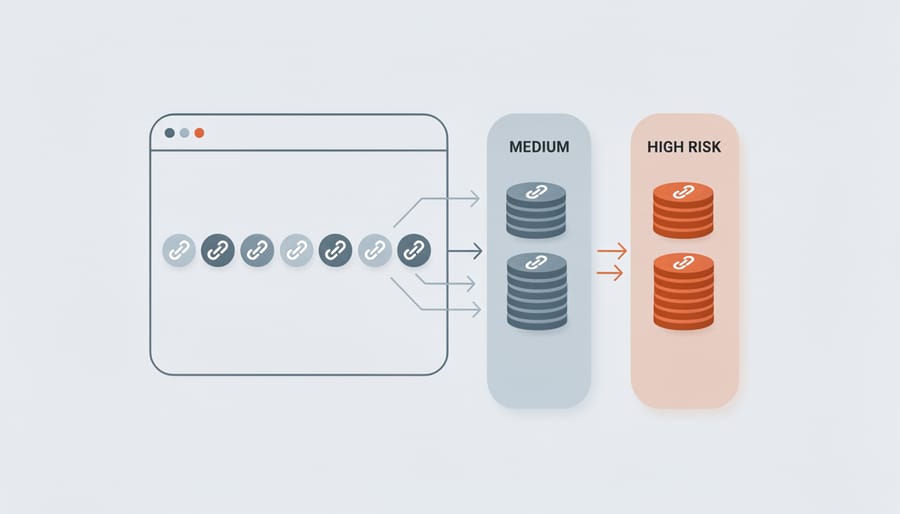
A simple rubric turns subjective hunches into repeatable decisions. Score each backlink on three dimensions using a 1–5 scale: relevance (does the linking page’s topic align with yours?), quality (is the site trustworthy, indexed, and maintained?), and risk level (are there spam signals, exact-match anchor abuse, or network footprints?). Add the three scores; totals below 6 flag immediate action, 7–10 warrant watchlist monitoring, and 11–15 indicate healthy links worth keeping.
This matrix gives your team a shared vocabulary and threshold for escalation. Document your scoring criteria in a shared spreadsheet so audits remain consistent across quarters. The goal is reproducibility, two people evaluating the same link should arrive at nearly identical scores, eliminating guesswork and enabling faster triage as your backlink profile grows. (I learned this the hard way after one audit where my pre-coffee scores and my post-coffee scores diverged by two full points on the same domain.)
Watch for
Score drift between auditors. If your team’s average scores on a known sample drift by more than one point across a quarter, the rubric isn’t tight enough. Recalibrate against five “gold standard” donors everyone has scored before, that’s the cheapest way to keep triage consistent.
When to Keep Links You Don’t Control
Not every uncontrolled link needs action. Most low-quality backlinks carry negligible weight in modern search algorithms, Google’s systems are built to ignore spam and irrelevant links automatically. Backlinko’s review of ranking factors notes that the value of low-quality links has been near-zero for years, which lines up with what I see in audit data: the bulk of “scary-looking” donors aren’t moving the needle in either direction.
If a handful of questionable directories or scraped content sites link to you, they’re usually (not always, but usually) harmless noise. Leave links alone when they come from genuinely independent sources with no malicious intent, even if the site quality is mediocre. Examples include organic forum mentions, authentic user-generated content, or legacy citations from defunct blogs. The key indicator: these links didn’t result from manipulation or negative SEO attacks.
Act when you spot patterns suggesting deliberate harm, sudden spikes in links from adult sites, gambling portals, or foreign-language spam networks. These coordinated attacks aim to trigger penalties. Also intervene if you’ve inherited a toxic profile from previous black-hat tactics or if manual review warnings appear in Search Console. The decision hinges on volume and intent. A few odd links scattered across years won’t move the needle. Hundreds appearing overnight signal trouble. (Saw exactly this pattern on a client property in late 2024, 380 refdomains in a 72-hour window, all Cyrillic, all pointed at the pricing page. Classic negative-SEO attempt.) Focus your disavow efforts where risk concentration is highest, algorithmic filters handle the rest.
Step 3: Mitigate, Remove or Disavow

The Remediation Workflow
Before you write a single email or list a single domain, get the order of operations straight. I’ve watched teams disavow first and outreach second, and end up doing twice the work. The flow goes:
Cleanup workflow
Outreach for Link Removal
When manual removal is your only option, use a direct, polite email template. State what you found, where, and what you’re requesting, no threats, no SEO jargon. Example: “Hi [Name], I found a link to [your domain] on [their URL] that appears to be part of a low-quality directory or paid scheme. We’re cleaning up our backlink profile and would appreciate if you could remove it. Thank you.”
This approach works best for clearly spammy directories, obvious PBNs, or sites with responsive webmasters. Success rate hovers around 10–30 percent depending on the network. (In my experience, the rate trends toward 10% for abandoned networks and 30% for sites with actual humans on the editorial side.) It’s worth trying for the worst offenders before you disavow, especially if you’re under manual review or see traffic drops correlating with specific toxic clusters.
Skip outreach when you’re dealing with abandoned domains, scraped content farms, or networks designed to ignore requests. Those cases go straight to your disavow file. Actually, before I even draft outreach emails now, I sort the toxic list by donor health first. Abandoned WHOIS, expired SSL, no recent posts, those skip the outreach queue entirely and land in the disavow pile from the jump. Also skip if the effort exceeds the risk, hundreds of weak forum links rarely warrant individual emails when measuring link effectiveness shows negligible impact. Prioritize domains with high spam scores linking to your money pages. Track responses in a spreadsheet; successful removals reduce your disavow file size and demonstrate good-faith cleanup efforts to Google if you later file a reconsideration request.
Disavow vs Outreach-Removal: Which First?
✓
Outreach first when
- ›You’re under a manual action and Google will read your reconsideration narrative
- ›The donor has a real human editor, contact form, or responsive WHOIS email
- ›Fewer than ~50 toxic donors, each worth a personalized email
- ›The link sits on a high-DR page that occasionally drives referral traffic
- ›You suspect negative SEO and want a paper trail of good-faith cleanup
✗
Disavow direct when
- ›Hundreds or thousands of toxic donors, outreach math doesn’t pencil out
- ›Abandoned domains, parked pages, or scraped content farms with no maintainer
- ›Networks designed to ignore takedown requests by design
- ›Algorithmic-filter recovery where Google won’t be reading any narrative anyway
- ›Foreign-language spam where outreach is functionally impossible
Building a Disavow File
A disavow file is a plain-text document you submit to Google Search Console listing domains or URLs whose backlinks you want ignored. The syntax is strict: each line contains one domain or URL, prefaced by “domain:” for domain-level disavowal or the full URL for page-level. Domain-level entries (domain:example.com) disqualify all links from that site, efficient for spam networks but risky if legitimate pages exist there. URL-level disavowal targets individual pages, offering precision but requiring more maintenance, especially when monitoring niche edits that may redirect or disappear.
Common mistakes that invalidate the file include using http:// prefixes on domain entries, adding comments without the hash symbol, mixing character encodings, or exceeding the 100,000-line limit. Always save as UTF-8 or 7-bit ASCII, use Unix line breaks, and comment sparingly with # to preserve readability. Test small batches first; a malformed file wastes weeks waiting for reprocessing.
Submitting Through Google Search Console
Once your disavow file is ready, navigate to Google’s Disavow Links Tool in Search Console and select your property. Click “Disavow Links,” then upload your text file. Google processes the submission within a few days to weeks, though you won’t receive confirmation of individual link devaluations.
Note
The Disavow Tool only works against URL-prefix properties. If your Search Console only has a Domain property registered, you’ll need to add a URL-prefix property for the exact protocol+host you’re cleaning up before the tool will accept the file. This is a recurring source of confusion, the tool’s UI doesn’t explain the requirement clearly.
Worth repeating: the tool doesn’t remove links, it instructs Google’s algorithm to ignore them when assessing your site. After submission, continue monitoring your backlink profile monthly to catch new toxic links early. Document your submission date and the number of domains disavowed for future reference, especially if you need to update the file later with additional bad actors. (Probably worth a Notion doc or a pinned Slack thread, whatever your team actually checks.)
Step 4: Monitor, Track Recovery and New Risks

Signs Your Cleanup Worked
Recovery isn’t instant, but three signals confirm your cleanup is working. First, watch organic traffic in Search Console and your analytics platform. After submitting your disavow file, allow 4–8 weeks for Google to recrawl and reprocess your backlink profile. A gradual uptick in sessions and impressions suggests algorithmic confidence is returning. Similarweb’s traffic estimates can corroborate the GSC signal if you want a third-party cross-check, though treat the absolute numbers as directional rather than precise.
Second, track ranking shifts for your core keywords. Use rank-tracking tools to monitor daily positions. If pages that dropped during the penalty begin climbing back into the top 20, even slowly, your risk mitigation is taking hold. Recovery rarely happens overnight; sustained upward trends over weeks matter more than single-day jumps. Three changes in six months is the cadence I look for, anything faster is usually noise.
Third, check Google Search Console messages and manual action reports. If you received a manual penalty notice, Google will send confirmation once it’s lifted. For algorithmic issues (no manual action), look for increases in indexed pages, crawl frequency, and the disappearance of coverage errors related to quality issues. Baseline these metrics before cleanup begins. Compare weekly snapshots to isolate which interventions moved the needle. If numbers stall after 90 days, revisit your disavow file or analyze whether new toxic links have appeared.
Automated Alerts for New Toxic Links
Real-time alerts turn your backlink profile from a once-a-quarter audit into a living watchlist. Most penalties stem from links that sat unnoticed for months, automated notifications compress that window to hours.
Pro tip
Layer your alerts. Search Console for manual actions (immediate email), a backlink monitor for new refdomains (daily digest), and a Domain Rating drop threshold (weekly summary). Three layers, three frequencies, you catch the catastrophic and the slow drift without drowning in noise.
Set up alerts in three layers. First, configure Google Search Console to email you immediately when manual actions are issued. Second, use your backlink monitoring tool to notify you daily when new referring domains appear, filtering by anchor text patterns that signal manipulation, exact-match commercial terms, over-optimized phrases, or foreign-language spam. Third, create a secondary alert for sudden drops in Domain Rating or spikes in toxic score thresholds you define during your baseline audit. (Plus, if you ever run into DNS or mail-config oddities on a donor you’re investigating, MXToolbox is the fastest way to confirm whether the site is even a live operation or just a parked shell, useful triage signal.)
The key is filtering signal from noise. A site gaining five backlinks daily doesn’t need five alerts, but a gambling domain linking with your brand name as anchor text does. Whitelist known partners and focus notifications on anomalies: new links from countries you don’t operate in, domains flagged during vetting link sources, or sudden batches of links appearing simultaneously. Test your alert pipeline by manually triggering a condition, add a suspicious domain to your tracker and confirm the email arrives within your target window. Weekly is reactive; daily is strategic.
Step 5: Prevent, Build a Link Strategy That Scales Safely
Why Editable Links Matter for Risk Management
Most risk management protocols assume your backlinks are static, once placed, they’re locked. But threat landscapes shift. A trusted partner site might pivot to spammy tactics six months later. An anchor text distribution that looked natural in 2023 could trigger filters after an algorithm update. The ability to edit anchor text and target URLs post-placement transforms risk management from reactive cleanup to adaptive control.
Traditional approaches force a binary choice: keep a problematic link and accept the penalty risk, or disavow it and lose any equity it provides. Editable links introduce a third option, revise the anchor to reduce over-optimization, redirect the target to more relevant content, or temporarily point it to a safer destination while you assess emerging patterns. This prevents the waste inherent in building links you later abandon.
Hetneo’s Living Links Technology demonstrates this principle in practice. Clients retain edit rights after placement, letting them tune anchor text ratios as search engines evolve, swap outdated landing pages without contacting publishers, or neutralize a link that becomes risky without filing a disavow. For proactive risk managers, it means every link remains a controllable asset rather than a permanent liability.
Vetting Placements Before You Buy
Before purchasing link placements, verify the legitimacy of every opportunity. Request transparent, auditable metrics: actual traffic screenshots, Search Console data, or analytics snapshots that prove real visitors land on the page. Inflated Domain Authority scores mean little if the site has no organic search presence or engagement.
Check for PBN fingerprints by examining the site’s backlink profile, registration patterns, and cross-linking structures. Sites that exist solely to sell links typically (almost always, honestly) show thin content, shared hosting IP blocks with dozens of other domains, or WHOIS records masked by the same privacy service. DomainTools surfaces the reverse-WHOIS view that exposes registrant clusters, and any of the major crawlers will surface the unnatural link patterns themselves, clusters of identical anchor text or sudden spikes in referring domains signal manipulation.
Examine the publication’s editorial standards. Real publishers have clear author bios, social media presence, consistent publishing schedules, and organic audience engagement in comments or shares. Request examples of recently published content and inspect the context where your link would appear. Placements surrounded by spammy anchor text or irrelevant outbound links dilute your own link equity and risk association penalties. For prospective vendors, ask upfront: Can I review exact placement URLs before committing? What happens if quality declines post-purchase? Legitimate providers welcome scrutiny and offer recourse options. Opacity at the vetting stage predicts problems later.
Putting the Five Steps to Work
Risk management isn’t a one-time audit, it’s a repeatable system. Each of the five steps feeds into the next, creating a loop that keeps your backlink profile healthy as your site grows and the web changes. Schedule quarterly reviews to catch new threats, document every disavow decision, and treat prevention as seriously as cleanup.
Catching toxic links proactively is also exactly the kind of background hygiene that gets quietly forgotten until it’s already a problem. Our managed link building plan runs a monthly anchor-text and referring-domain review as part of the engagement, plus the disavow-file maintenance and the post-placement monitoring described above. It’s the cheapest insurance against the cleanup cycle this post just walked through, the work doesn’t go away, it just stops being your problem on the second Monday of every month.
Try it this week
Audit your top 50 refdomains, score them, and build draft batch zero of the disavow file.
-
1
Export your refdomains from GSC and one third-party crawler. Dedupe. Sort by DR descending, take the top 50. -
2
Score each on the 1–5 / 1–5 / 1–5 matrix (relevance, quality, risk). Flag the sub-6 totals for the disavow draft. -
3
Build the file in the syntax above. Don’t submit yet, sit on it 48 hours, then re-read with fresh eyes before upload.
The 48-hour pause catches more false-positives than any tool. That’s where ranking-saving discipline lives.
Related guides
- Spotting Expired Domains, Weekly process for surfacing topic-relevant expired domains before competitors find them.
- PBN Penalty Risks, How PBN footprints get detected and what that costs sites running them.

